CRM and email automation
Follow-ups depend on someone remembering
Leads go cold because the update was going to happen after the next call. I connect your inbox, forms and CRM so records update themselves, and replies are drafted for a person to approve.
WHEN TEAMS CALL
When CRM automation helps
- Inquiries sit in a shared inbox.
- The CRM is out of date by Friday.
- Follow-ups are tracked in someone's head.
- The same reply is typed many times a week.
When it is not the right fit. If your sales process is not agreed yet, automating it will only spread the confusion.
HOW I WORK
CRM automation, step by step
Each step ends with something you can look at, so nothing is built on a guess.
Follow one inquiry
I trace a real message from arrival to outcome and note every manual step.
Keep the record clean
Contacts are matched before they are created, so the automation does not fill your CRM with duplicates.
Draft, do not send
Replies are prepared from your own templates and history. A person approves them until you decide otherwise.
Schedule the follow-up
Reminders depend on what happened, not only on the date.
Log every action
Each run records what it did, so you can see why a message was or was not sent.
WHAT YOU GET
Deliverables
- Working flows between inbox, forms and CRM
- Reply drafts with an approval step
- Duplicate checks and error alerts
- A guide to changing the templates
WHAT I NEED
To get started
A test account in your CRM and mail system, and examples of typical messages.
Further reading: the n8n documentation.
QUESTIONS
Before you ask
Will it send emails by itself?
Only if you choose that for specific cases. The default is a draft that waits for approval.
Which CRMs can you connect?
Any CRM with an API. The details are confirmed before the work starts.
What if the AI reads a message wrongly?
Low-confidence messages go to a person without a draft, and every decision is logged.
RELATED WORK
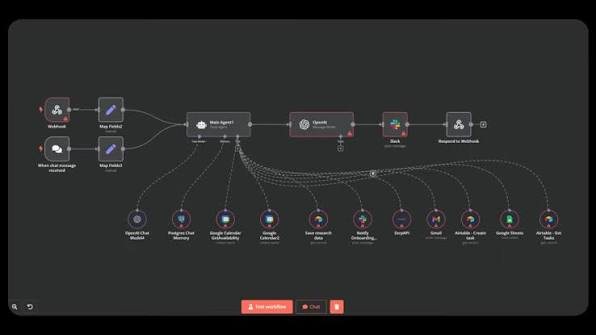
An assistant with persistent memory and CRM integration.
Executive assistant with memory Read the work
WORKING TOGETHER
What to expect
- Who does the work
- I do, from the first conversation to the handover. Nothing is passed to someone else.
- Where it happens
- Remotely, with calls planned around overlapping hours. Your data stays in your environment wherever possible.
- Confidentiality
- I am happy to sign an NDA before seeing anything, and I do not name clients.
- Before work starts
- You receive a written scope and a quotation. Nothing begins until you agree to both.
- At the end
- Everything is documented and handed over, with logic in version control. You own it.
- Reply time
- I answer new requests within one to two days.
RELATED SERVICES
Often needed together.
Tell me what you need. I will send you a quotation.
A few lines about the problem and the data behind it are enough to start. I reply with questions, then a clear scope and a quotation.